
tl;dr:
- Requests to Microsoft Graph’s
$batchendpoint bundle several API calls into one JSON object. This makes analyzing Azure Portal traffic difficult, since underlying API calls for requests to the$batchendpoint are not individually logged. - This post shares the graph_batch_parser.py Burp Suite extension as a way to speed up analysis of
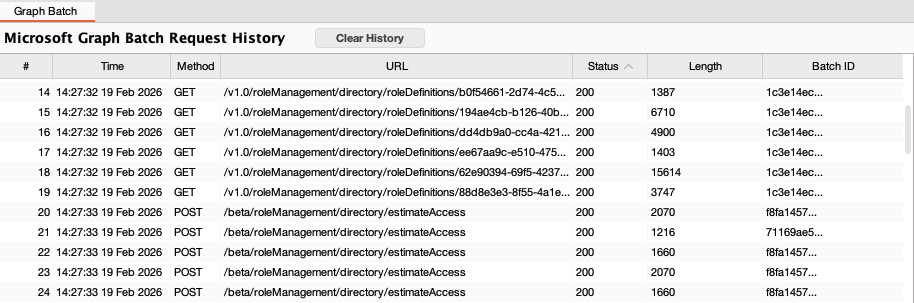
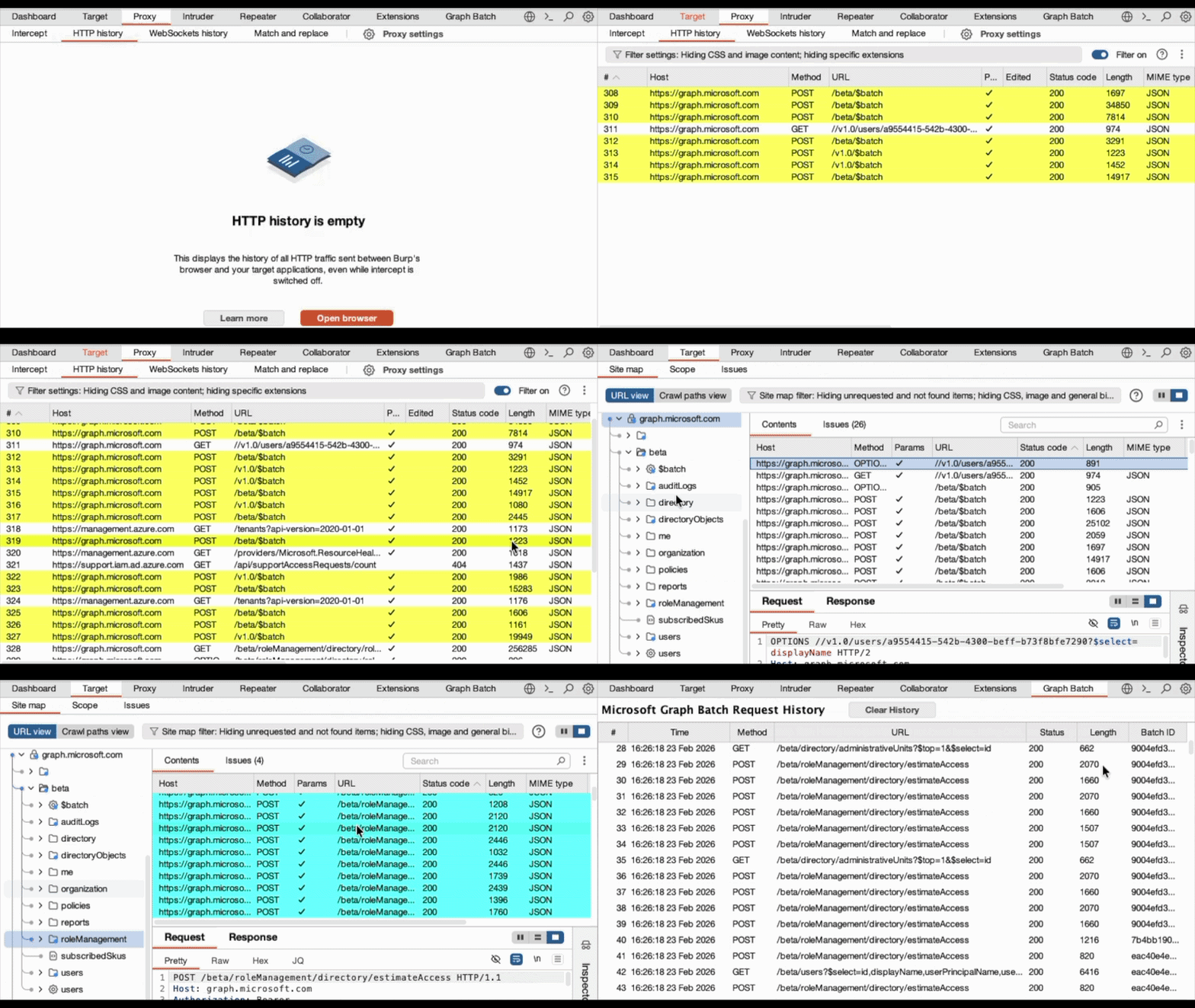
$batchrequests. The extension processes$batchrequests into a set of synthetic request/response pairs. Requests can then be reviewed in the “Graph Batch” tab, as well as Burp’s Site Map.
Batch what now?
Hands up if you’ve ever played around with Entra in the Azure Portal, wondering what API calls are made for different actions! 🤚
…or is that just me?
If you ever look at what network traffic the Azure Portal generates under the hood, you’ll find that while some of Entra’s API calls are made to individual endpoints in Microsoft Graph (graph.microsoft.com), many more are made using the “batch” endpoints:
graph.microsoft.com/v1.0/$batchgraph.microsoft.com/beta/$batch
Batch requests are key to reducing individual requests to the Microsoft Graph API, especially when performing an action that requires multiple API calls. Think of scenarios like fetching all of a user’s object details, group memberships, and role assignments; or getting the individual counts of all users, devices, and groups in a tenant. By reducing the number of API calls needed for these actions, an application can serve its content without waiting on dozens of individual API responses.
Each request to the /$batch endpoint can contain up to 20 individual API requests, bundled into a single JSON request.
As an example, the POST request body below was generated to the $batch endpoint by the Azure Portal while browsing user details. It contains requests to both the /policies/authenticationmethodspolicy and /reports/healthmonitoring/alerts endpoints:
1
2
3
4
5
6
7
8
9
10
11
12
13
14
15
16
17
18
19
20
21
22
23
24
25
26
27
{
  "requests": [
    {
      "id": "46439850-987f-4e92-9533-9eecfe564b82",
      "method": "GET",
      "url": "/policies/authenticationmethodspolicy",
      "headers": {
        "x-ms-command-name": "AuthenticationMethods - GetAuthenticationMethodsPolicy",
        "x-ms-client-request-id": "946edd68-c6ff-4a61-8a26-568f23a87cce",
        "client-request-id": "946edd68-c6ff-4a61-8a26-568f23a87cce",
        "x-ms-client-session-id": "f5b5dc47a5ca4d819edcf0e9e54131fd"
      }
    },
    {
      "id": "d8205284-3f40-45df-b990-50ef26f74564",
      "method": "GET",
      "url": "/reports/healthmonitoring/alerts?%24filter=state+eq+%27active%27+and+createdDateTime+gt+2026-02-12T19%3A27%3A32Z",
      "headers": {
        "Prefer": "include-unknown-enum-members",
        "x-ms-command-name": "ScenarioHealthMonitoringScenario - BK",
        "x-ms-client-request-id": "7864a4ab-9e7c-4203-a9bf-a83fd11ad3f9",
        "client-request-id": "7864a4ab-9e7c-4203-a9bf-a83fd11ad3f9",
        "x-ms-client-session-id": "f5b5dc47a5ca4d819edcf0e9e54131fd"
      }
    }
  ]
}
How often are these batch requests used? Looking in Burp Suite, the answer is quite a lot: 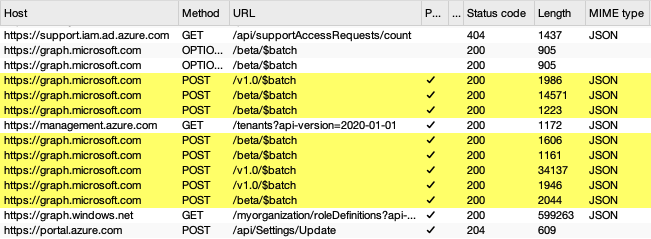
And wow, do I ever hate them!
Analysis spaghetti
You might ask why I’m opposed to such a helpful endpoint. Isn’t better app performance better for everyone?
Unfortunately, in this case what’s good for developers is difficult for researchers:
- Batch requests only log a single request in Burp’s HTTP History tab, do not generate an entry for the API requests within the batch request. This makes it hard to review which individual API requests were made.
- The requests inside a batch request will never populate Burp’s Site Map! Only the
$batchendpoint will be logged for a batch request. This makes it hard to review Microsoft Graph API structure. - The
$batchendpoint supports up to twenty (20!) requests in one! That’s a lot of scrolling.
So unless going through hundreds of these requests is your idea of a good time… 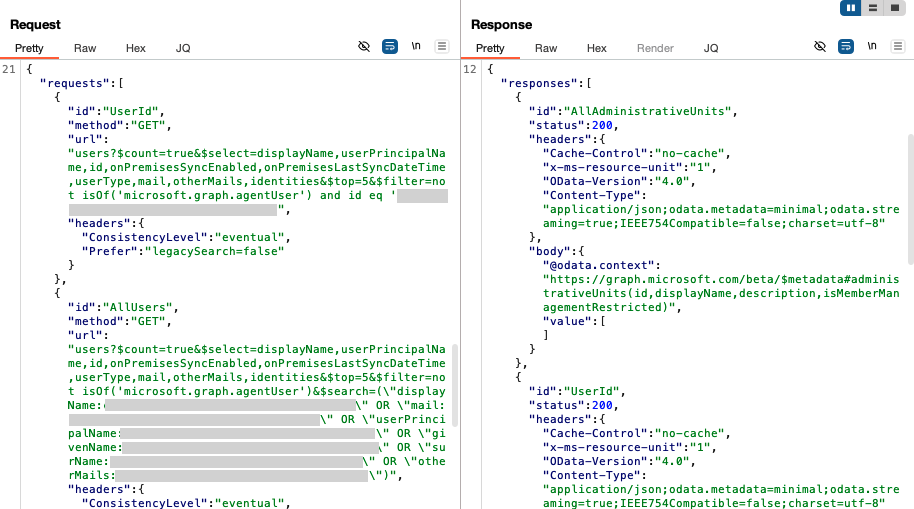
…you’re not going to have a good time.
The Graph Batch Parser
I needed to understand how new and existing Azure Portal features work, and didn’t want to lose my mind scrolling.
To help with this, I created a Burp Suite extension for my own research. This extension performs the following steps:
- Parses all
$batchrequests into a set of equivalent (synthetic) API requests - Displays these synthetic requests for easier review in the Graph Batch tab
- Adds them to Burp’s site map, highlighted in cyan
After testing it out and finding it helpful, I’d like to share in case anyone else has pulled their hair out over batch requests before.
You can find it here:
Disclaimer: This extension contains LLM/AI assisted code. That said: I’ve designed it, put it through reviews, tested its performance, and used it in my own research. Based on my own testing, I think this is in decent shape to share.